



Skip to content
Information team+90 (216) 235 14 17Weekdays 09:00 – 00:0025% revenue share for resellers for 12 months
FeaturesPricingResellersCall the information team+90 (216) 235 14 17 · Weekdays 09:00 – 00:00
Product · Technical maintenance

Technical maintenance and work order management

From the lift to the generator, periodic maintenance is on the calendar, faults are in work orders and meters are recorded period by period. Work in the field is visible in the panel; completed work can also be opened to residents if you wish.

  • Periodic maintenance reminders
  • Work orders with photos and costs
  • Meters and heat cost allocators

Every job due for maintenance is visible in advance.

Regular maintenance such as the lift, generator, fire system, pool and landscaping is planned in the panel; a fault or maintenance job is assigned to a staff member or company with a work order.

Technical staff working on the electrical panel.
Electrical and technical infrastructure
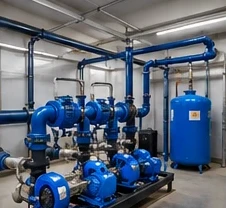
Booster and pump room.
Booster and pump room
The property's shared pool and sun loungers.
Pool
Which problem does it solve?

Let maintenance rely on the calendar, not on memory.

In most properties todayWith Yapıyön

The lift's maintenance date stays in a diary or in the company's reminder.

Maintenance is tied to the calendar.The list of the next 30 days and overdue maintenance on one screen; maintenance that falls due is turned into a work order.

Faults get lost in messages; who looked at them and what they cost is unclear.

Every fault becomes a work order.Location, person responsible, status, photo and cost in the same record. When the job is done, it is closed with its record.

Heating and hot water shares are in a spreadsheet, allocated by hand.

Readings are entered; the amount comes out on the same screen.Enter the readings one by one or upload them with a template; the unit amounts are calculated, and once billed they are posted to the units as charges.

Cleaning is tracked with paper lists and by word of mouth.

Tasks are generated automatically from the frequency on the area card.Staff carry out the job from their own screen; the supervisor checks and asks for it to be redone if needed. Which area was cleaned and when is shown in the cleaning report.
Real screen

The next 30 days, on one list.

The Reminders screen shows upcoming and overdue maintenance. On the left, the whole Technical and Facilities menu is open: all of the parts below are in this menu.

  1. 1

    Upcoming and plannedMaintenance whose date is near shows as “Upcoming”, maintenance further ahead as “Planned”; overdue maintenance also stays on the list.

  2. 2

    Maintenance DoneWhen maintenance is done, the next date moves forward automatically by the interval you entered.

  3. 3

    Company and typeLift, generator, fire system, pool and landscaping; the company for each maintenance is written in the record.

Maintenance, type, company, next date and status; the record is closed with “Maintenance Done”.
Who uses it?

Everyone sees their own share.

Property managerSets up the maintenance calendar, opens and closes work orders, sees costs and photos.
Technical staffWorks with a simple menu containing only the technical screens; follows the jobs assigned to them.
Cleaning and field staffSee their area and task on their own screen. Cleaning screens in 8 languages.
Board and auditorReview completed maintenance and spending in one place during the audit.
ResidentsSee the completed work published by the management in the portal; report faults as requests.
How does it work?

The life of a maintenance job in four steps.

Where each step is in the panel is written beneath it. You can follow the same path in the demo panel.

01Define the maintenanceEnter the type, the maintenance company if any, how often it is done and the date of the last maintenance.

In the panel: Technical & Facilities › Periodic Maintenance

02A work order when it falls dueUpcoming and overdue maintenance on the list; turned into a work order with one button.

In the panel: Technical & Facilities › Reminders

03The work is done in the fieldThe work order is assigned to a staff member or a company; status, photo and cost are added.

In the panel: Technical & Facilities › Work Orders

04The record is closedWhen you say “Maintenance Done”, the next date moves forward automatically; the photo and video of the maintenance are added to the record.

In the panel: Technical & Facilities › Periodic Maintenance

Type tabs, last done and next date; “Turn Due Items into Work Orders” at the top right.
Parts of the module

From maintenance to supplies, all of the facility's work.

Work ordersAssign a fault or maintenance job to a staff member or company and follow its status. Photos and costs are added; completed work can be opened to residents if you wish.
Work OrdersCompleted Work (visible to residents)Common Areas
Periodic maintenanceLift, generator, fire system, pool and landscaping maintenance on the calendar. The photo and video of the maintenance are added to the record; the company's invoice is entered as an expense.
LiftGeneratorFire SystemPoolLandscapingReminders
Meters and heat cost allocatorsRead the heating, hot water and water meters and enter the bill amount; the unit amounts are calculated on the same screen. Bills for block and common area meters are also processed here.
Heat Cost Allocator Reading and BillingMeter Bills
Assets and warrantyRecord items such as generators, pumps and furniture with their location; track depreciation and warranty end dates.
AssetsDepreciation & Warranty
Cleaning and fieldAreas, staff assignment, shifts and cleaning instructions. Which area was cleaned and when is taken from the cleaning report for a date range.
Cleaning AreasStaff AssignmentCleaning ReportCleaning Status
Supplies and issued itemsStock of cleaning and maintenance supplies, staff supply requests; radios, keys and work clothing issued to staff.
Supplies & StockSupply RequestsItems Issued to Staff
Key benefits

Four gains from maintenance work.

Reminders don't forgetThe list of the next 30 days and overdue maintenance is up to date every day.
Jobs close with their recordPhotos and costs are inside the work order; you don't search for them at the audit.
Costs go to the ledgerThe maintenance company's invoice is posted to its account; the expense reaches the journal automatically.
Residents are informedYou publish completed work in the resident portal; the “nobody is looking into it” question comes up less.
Related modules

The modules technical maintenance is connected to.

Security and access controlVisitors, card and plate access, patrol points and incident reports are monitored from the security desk.
Staff and field managementShifts, leave and working hours are in the staff module; tasks are assigned to the technical team from there.
General accountingMaintenance and repair expenses are posted to the 7-series expense accounts, and the amount owed to the company to account 320 Suppliers.
Frequently asked questions

Questions about technical maintenance.

If you have another question, write to us; our team replies the same day.

How do periodic maintenance reminders work?

For each maintenance, you enter the date it was last done and how often it is done. The Reminders screen shows the list of the next 30 days and overdue maintenance. When you say “Maintenance Done”, the next date moves forward automatically by the interval you entered.

Does maintenance that falls due automatically become a work order?

If you tick the “automatic” option in the maintenance record, a work order is opened every morning at 06:00 when it falls due. If you prefer, you can also turn all due maintenance into work orders with one button.

Do I have to enter meter readings one by one?

No. You can download the template from the reading screen, fill it in the field and upload the file to fill the table in one go. You check the unit amounts on the same screen before billing.

Do technical staff see the whole panel?

No. Technical staff work with a simple menu containing only the technical screens. Permissions are defined by department; the permission table is changed by the chairman of the board or the responsible manager.

Which files are added to the maintenance record?

The photos and videos of the maintenance are added. The maintenance company's invoice is entered as an expense invoice; the amount is posted to the company's account and to the accounts.

Can residents see completed work?

Yes. You can open completed work to residents; residents see the work done by the management in the portal. They open a request for a fault or wish, and the reply is kept as a message thread.

Introduce your property to Yona, our AI robot.

Select your number of units and enter your details; the agreement and payment link arrive the same day.